Short answer: in our June 2025 test on dense pages from 10 public financial filings, Docling gave the best balance of structure and accuracy (grade B+), followed by Dolphin (C+), PaddleOCR (C), SmolDocling (C-) and MarkItDown (D). No library was perfect, so for finance-grade accuracy, pair an OCR library with an LLM and add checks, like making sure table totals add up.
Authors: Shikhar Jha and Abhav Bhanot
What changed since the original post (2025): we restored Abhav Bhanot as co-author and corrected the compute requirements table. We also added a section on what's new in each tool since we ran the test, plus an FAQ. The test results themselves are unchanged. For a newer comparison, see our OCR Benchmark 2026: PaddleOCR vs Docling vs LlamaParse vs Surya.
Introduction
Every finance professional knows the frustration of handling large, complex PDF documents filled with intricate tables, multi-column layouts and detailed footnotes. Extracting data from them by hand isn't just slow, it's prone to errors.
Optical character recognition (OCR) frameworks promise relief by automatically converting these documents into structured formats like Markdown or HTML. But can today's OCR tools reliably handle challenging Wall Street PDFs without losing critical financial data? We tested five popular open-source OCR frameworks to find out: Docling, Dolphin, PaddleOCR, MarkItDown and SmolDocling.
Developers have plenty of options for text extraction, including cloud OCR services like Azure Document Intelligence, AWS Textract and Google Cloud's Document AI. In this article, we focus on comparing open-source libraries.
Should we just use an LLM for document extraction?
It's tempting to send documents straight to an LLM. Some state-of-the-art models are already very good at this task and are a real alternative to traditional OCR services. That was already true in late 2023, when we compared GPT-4V with a prominent cloud OCR service.
However, while a multimodal, long-context LLM can give good results on large documents, its accuracy is still not good enough on its own for sensitive industries like financial services and healthcare. These need very high accuracy (above 90%), and that's where relying on an LLM alone falls short.
In our experience with these use cases, OCR libraries combined with LLMs give the best results for document extraction.
Before we look at the most promising candidates, here's why OCR frameworks matter.
Why OCR frameworks matter
OCR frameworks offer finance teams real advantages:
- Speed: converting a complex financial document by hand can take hours. With an LLM alone, it can take several retries and cost a lot. An OCR library does it in seconds.
- Accuracy and reliability: reliable numbers are vital for compliance, audits and financial analysis.
- Cost: the right OCR library cuts both cloud service bills and the time spent fixing output afterwards. Hosting an open-source library on your own infrastructure means you can run as many documents as you like.
OCR libraries we evaluated
- Docling: a versatile library that converts documents into structured Markdown. GitHub
- Dolphin: a multimodal model from ByteDance that analyzes page layout, then parses each element. GitHub
- PaddleOCR: a full OCR toolkit with support for many languages and lightweight models. GitHub
- MarkItDown: a lightweight Python utility from Microsoft that converts documents into Markdown. GitHub
- SmolDocling: a compact vision-language model for structured extraction. Hugging Face
Compute requirements
Here's what each tool needs to run, based on each project's documentation as of September 2026:
| Framework | Python | GPU | Notes |
|---|---|---|---|
| Docling | 3.10+ | Optional | Runs fully on CPU, including offline |
| Dolphin | 3.x with PyTorch | Recommended | Model-based; supports vLLM and TensorRT-LLM for faster inference |
| PaddleOCR | 3.8 to 3.12 | Optional | NVIDIA GPUs with CUDA 12; CPU via ONNX Runtime or OpenVINO |
| MarkItDown | 3.10 to 3.14 | Not needed | Text conversion; no layout model |
| SmolDocling | 3.x with PyTorch | Optional | Small 256M-parameter model; faster on GPU |
A trend worth watching: one model for the whole page
Traditional OCR runs in separate steps: find the text, read it, then work out the layout. Newer tools increasingly use a single transformer model that looks at a page image and directly outputs structured text, combining visual and language understanding in one step.
Two of the tools we tested work this way:
- Dolphin: ByteDance's model uses a two-stage "analyze, then parse" approach. First, it analyzes the whole page and lists the layout elements in natural reading order. Then it uses those elements as anchors and parses each one in parallel with task-specific prompts. This lets it handle complex document structures efficiently.
- SmolDocling: built by IBM Research and Hugging Face, SmolDocling is a compact vision-language model with 256 million parameters. It processes entire pages and outputs "DocTags", a markup format that captures content, structure and layout, combining OCR, layout detection and content understanding in a single model.
These models show how transformers can simplify document processing by handling visual and text analysis together.
How we ran the tests
We selected pages from 10 public financial documents, choosing only the sections most likely to challenge OCR frameworks: pages dense with complex tables and mixed text layouts. This gave a tougher test than running whole reports. We ran each framework on these samples and scored:
Table reconstruction
- Numeric precision
- Heading hierarchy accuracy
- List and data integrity
Scoring criteria
- High: 80% accuracy or more
- Medium: 60% to 79% accuracy
- Low: below 60% accuracy
Detailed findings
OCR framework scorecard (June 2025)
| Framework | High | Medium | Low | Overall grade | Typical issue |
|---|---|---|---|---|---|
| Docling | 2 | 6 | 2 | B+ | Merged-cell tables split |
| Dolphin* | 0 | 6 | 3 | C+ | HTML colspan confusion |
| PaddleOCR | 0 | 6 | 4 | C | Space-aligned table drift |
| SmolDocling** | 0 | 5 | 5 | C- | Silent page skips |
| MarkItDown | 0 | 4 | 4 | D | Flat text, no structured tables |
*One Dolphin test crashed on a 300-page document and was not included in scoring.
**SmolDocling's output looks good, but it skipped pages while processing multi-page PDFs.
Case study: Apple's underwriting schedule
Below is a screenshot of the underwriting table from Apple's SEC filing (Form 8-K, May 5, 2025). We used it as the "ground truth" for this case study:
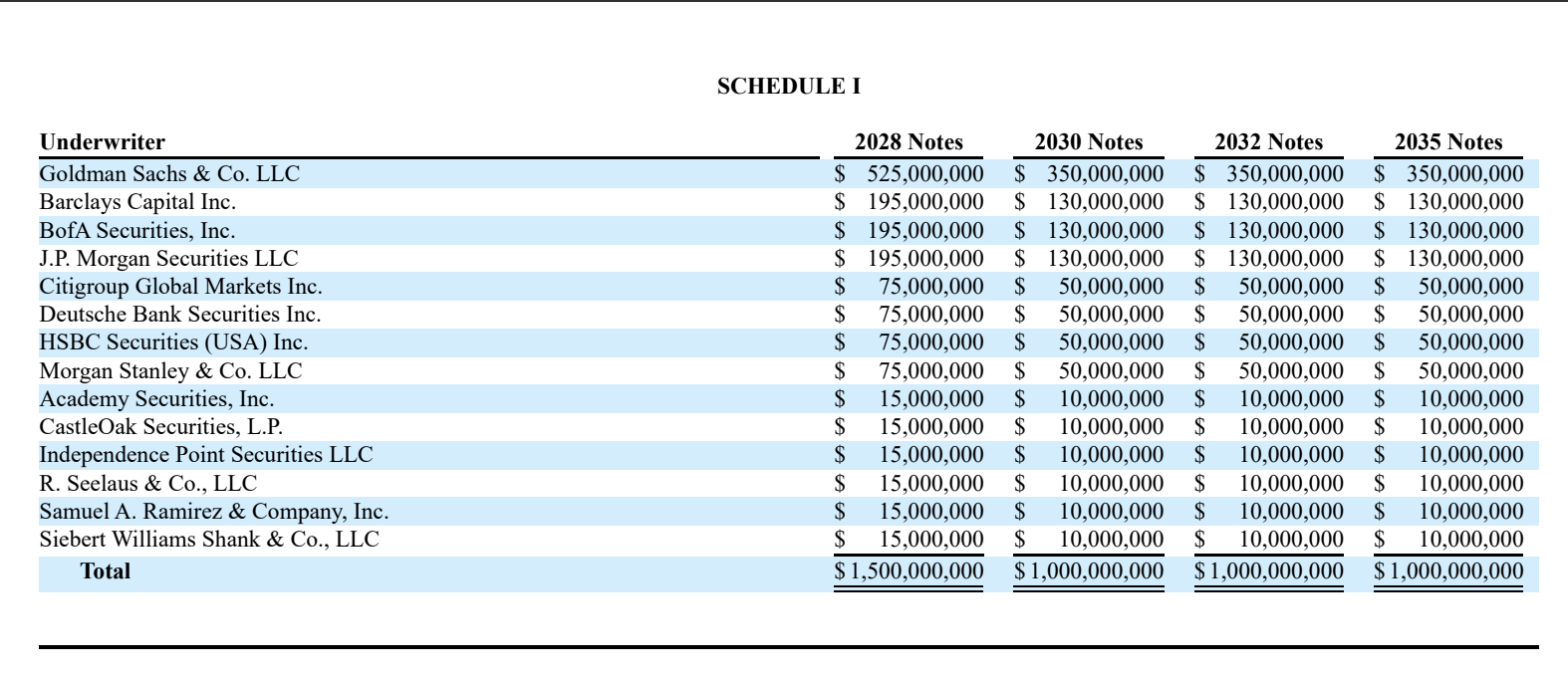 Underwriting table from Apple's Form 8-K filing, used as ground truth
Ground truth: underwriting table from Apple's Form 8-K (May 5, 2025)
Underwriting table from Apple's Form 8-K filing, used as ground truth
Ground truth: underwriting table from Apple's Form 8-K (May 5, 2025)
OCR outputs compared
Docling: precise, structured Markdown tables that need minimal corrections.
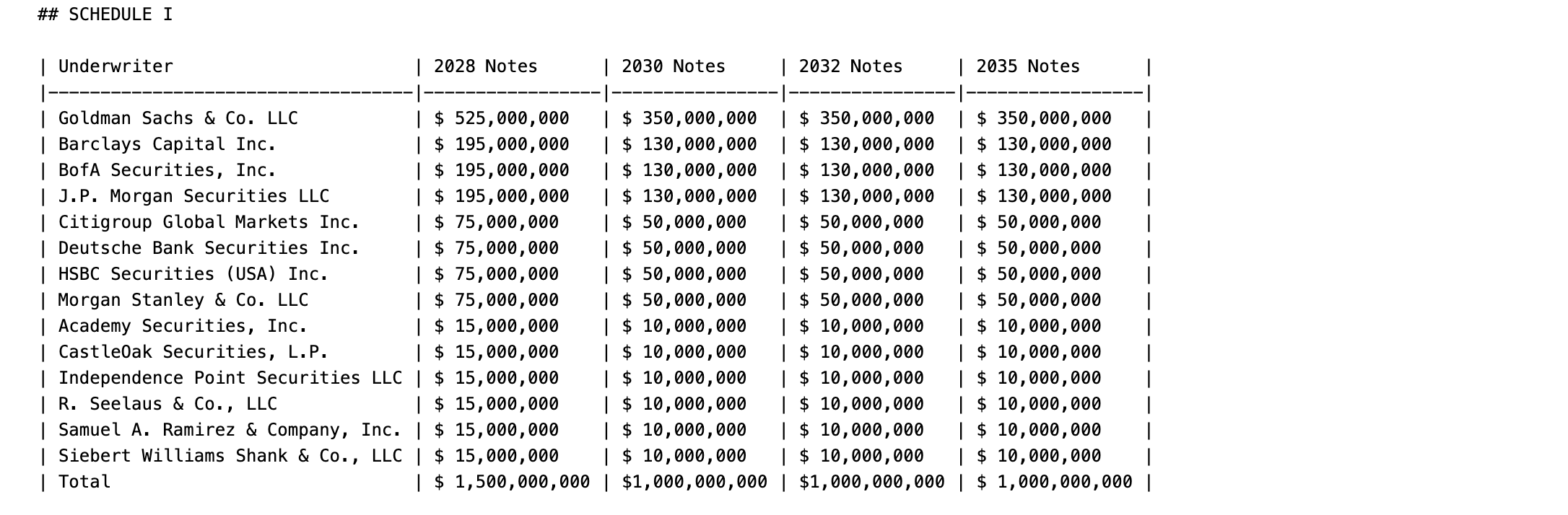 Docling output of the underwriting table
Docling output
Docling output of the underwriting table
Docling output
Dolphin: good HTML structure, but struggles with complex merged cells.
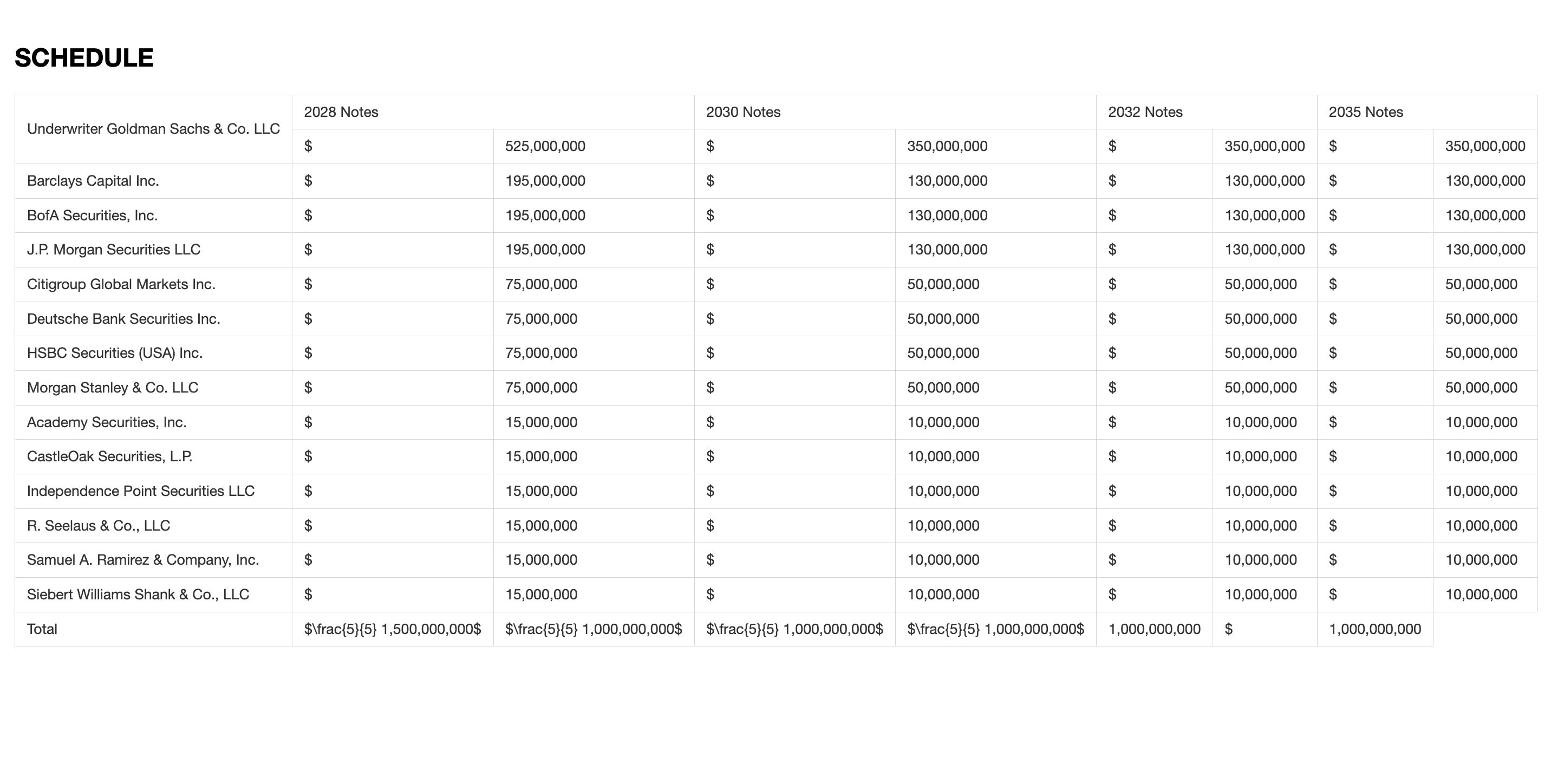 Dolphin output of the underwriting table
Dolphin output
Dolphin output of the underwriting table
Dolphin output
PaddleOCR: quick text extraction, but with misalignments and numeric errors.
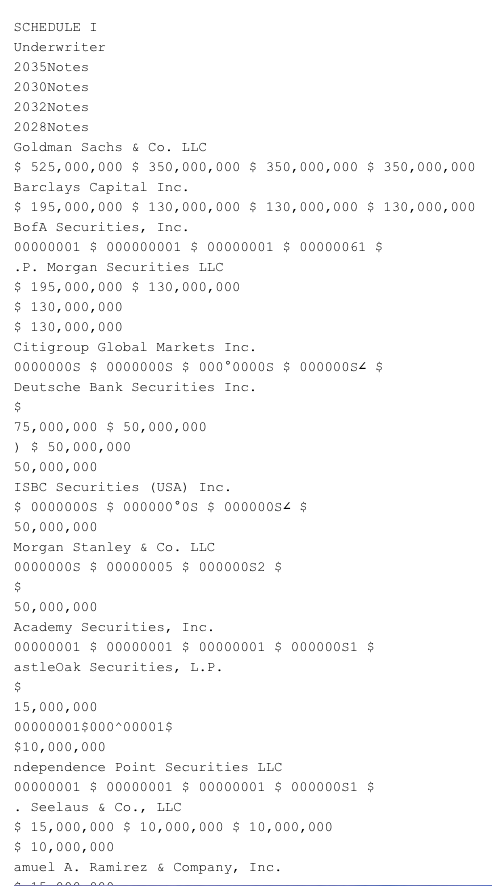 PaddleOCR output of the underwriting table
PaddleOCR output
PaddleOCR output of the underwriting table
PaddleOCR output
MarkItDown: fast, but outputs unstructured, flat text.
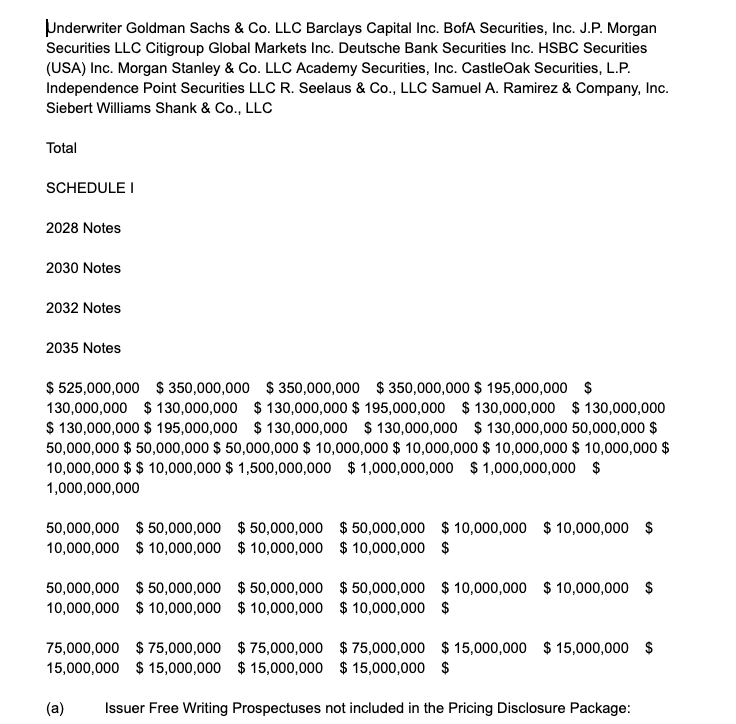 MarkItDown output of the underwriting table
MarkItDown output
MarkItDown output of the underwriting table
MarkItDown output
SmolDocling: good visual output, but inconsistent because of skipped pages.
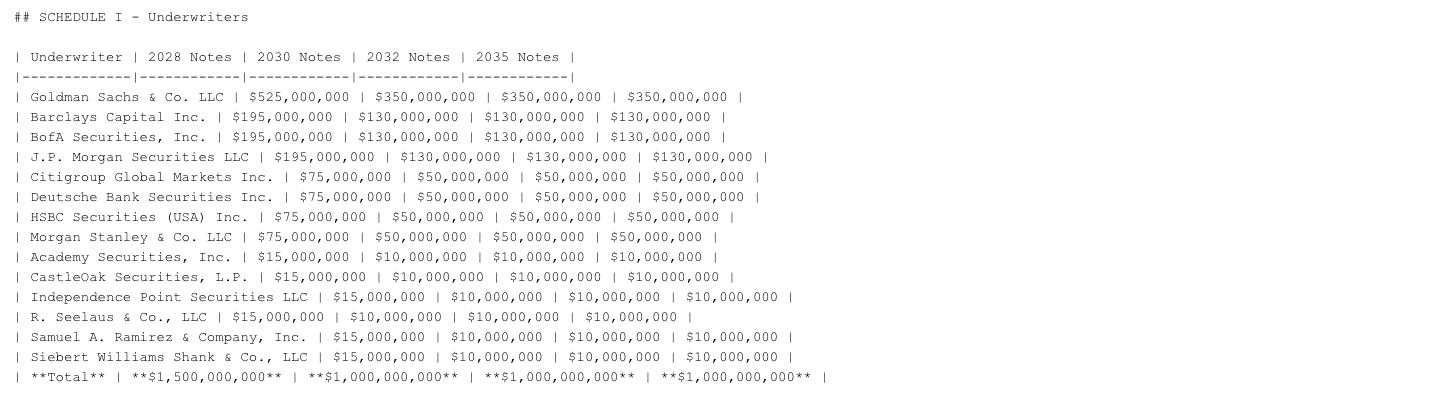 SmolDocling output of the underwriting table
SmolDocling output
SmolDocling output of the underwriting table
SmolDocling output
Recommendations for practical use
- Docling: recommended for precise, structured Markdown tables with minor corrections.
- Dolphin: suitable for HTML pipelines and simpler structured layouts.
- PaddleOCR and MarkItDown: best for raw text extraction, where speed matters more than structure.
- SmolDocling: promising, but unreliable at the time of testing because of page skipping.
What's changed since we ran this test
These tools move fast. Our scores reflect the versions available in June 2025. Here's what has changed since, based on each project's release notes:
- Docling now needs Python 3.10 or newer. It added a vision-language pipeline that uses IBM's GraniteDocling model, and new formats, including XBRL financial reports, which is directly relevant for finance teams.
- Dolphin released Dolphin-1.5 in October 2025, keeping the small 0.3B-parameter size with better parsing. Dolphin-v2 followed in December 2025: a larger 3B-parameter model with more element types, formula and code parsing, and better handling of photographed documents.
- PaddleOCR moved to version 3, with PaddleOCR-VL, a vision-language model for full document parsing. Version 3.7 was released in June 2026.
- SmolDocling has been succeeded by Granite-Docling-258M (released September 2025), which IBM reports scores better on layout, table and equation recognition.
- MarkItDown can now describe images with an LLM, and a separate plugin adds LLM-based OCR for PDFs and Office files.
Our advice: if you're choosing a tool today, re-test the latest versions on a sample of your own documents. Our 2026 OCR benchmark is a good starting point.
Conclusion
Despite big advances in OCR technology, complex financial documents are still challenging. Among the libraries we evaluated, Docling stood out for its balance of structured output and accuracy. But no OCR library delivers perfect results without some post-processing.
So how can you extract data from complex documents today? Some guidelines:
- Use Markdown as the bridge to LLMs: converting documents to Markdown is central to agent-based systems. It makes it easy for LLMs to summarize, extract entities and answer questions, and well-structured input makes that downstream work faster and more accurate.
- Plan for scale: when running any of these libraries at scale, consider performance and resource use. PaddleOCR and SmolDocling are built for high throughput. Docling also scales well, especially inside multi-agent systems.
- Watch the costs: at high volume, costs really matter. Cloud OCR services usually charge per page or per extraction. Self-hosting an open-source library shifts the cost to infrastructure and needs more technical expertise to deploy and run.
The right OCR library depends on your project: document complexity, volume and the computing resources you have. Whatever you choose, add validation after extraction, such as checking that totals add up and that no pages are missing, to protect the integrity of your data.
Happy parsing!
FAQ
What's the best open-source OCR library for financial PDFs? In our June 2025 test, Docling scored highest (B+), mainly because it rebuilt complex tables most accurately. Tools have improved since, so test the latest versions on your own documents.
Can I use an LLM instead of OCR? LLMs are good at reading documents, but on their own they don't reach the accuracy finance and healthcare need. Combining an OCR library with an LLM gives better, more consistent results.
Do I need a GPU to run these tools? Not for Docling, PaddleOCR or MarkItDown, which all run on a CPU. Model-based tools like Dolphin run much faster on a GPU.
How do I check that extracted financial data is correct? Add automatic checks after extraction: make sure table totals match their line items, that numbers keep their decimals and signs, and that every page of the source document was processed.
Need help extracting reliable data from complex documents? Talk to Newtuple.