
Short answer: when AWS launched Amazon Q at re:Invent 2023, it was essentially a fully managed retrieval-augmented generation (RAG) service: connect your company's data sources, and get a ChatGPT-style assistant that answers questions from that data, with AWS security and access controls built in. That product became Amazon Q Business. As of 2026, Q Business is no longer offered to new customers, and AWS points them to its successor, Amazon Quick.
2026 update: where Amazon Q stands today. This post is our first look from November 2023, and we've kept it as it was written. A lot has changed since:
- The product we tested became Amazon Q Business. AWS now says Q Business "is no longer available to new customers" and calls Amazon Quick its next evolution: an AI assistant with agents for research, business insights and automation. Existing Q Business customers can keep using it, or use their existing Q index with Quick.
- The coding side became Amazon Q Developer. AWS will end support for the Q Developer IDE plugins on April 30, 2027, and recommends Kiro, its agentic coding tool, for similar features.
- Our core read still holds: the big cloud vendors package RAG with enterprise security and access control. What's changed is that these assistants now take actions through agents, not just answer questions.
Amazon recently launched "Q" at its flagship event, AWS re:Invent. First off, the choice of name is interesting, as there's been all sorts of speculation around OpenAI and Q* and the rumours of some sort of AGI on the horizon. Was "Q" the original name for the AWS service, or was it just re-branded quirkily to take advantage of the rumour mills? We don't know for sure.
In any case, Q is the latest in a series of GenAI announcements that have picked up pace from all the major players in the world of cloud, software and data. There's an announcement of a new AI tool almost every day these days, and AWS doesn't want to be left behind. I spent some time trying out Amazon Q. Skip straight to the setup walkthrough or my verdict below if you wish.
So what exactly is Q? And what's going on behind the scenes?
In my early experiments with Q, it seems quite clear that this is a managed service for a retrieval-augmented generation (RAG) based AI bot. For those not familiar with the terminology, it's essentially an AI bot that can answer questions against your own data sources. To summarize:
Amazon Q provides a fully managed service for an organization to connect to its own data sources and run an AI bot against these data sources.
What Amazon has done here is neatly package all the components of building a RAG application inside a single AWS service. The service takes care of connecting to multiple data sources, creating different applications, applying IAM rules, and deploying the application with a neat UI out of the box, which resembles ChatGPT.
Similar services, or variants of them, have been launched by Google Vertex AI Search and Azure AI Search.
Behind the scenes
Amazon Q uses multiple other AWS services behind the scenes to provide the "one stop to GenAI" experience. Here's what I've been able to glean so far:
- Searching and indexing is done through Amazon Kendra. Think of this as the drop-in replacement for the vector store in other RAG applications.
- Orchestration is done with the help of Lambda functions.
- Authorization, role-based access and so on are managed by IAM.
- Credentials are managed in AWS Secrets Manager.
- Logging is done in CloudWatch.
- GenAI? Pretty sure it's using a hosted model on Bedrock, I'm just not sure what the base model is. I suppose this will also be customizable in the future.
- User authentication is probably handled by Cognito (but I'm not sure about this).
As you can see, this offering is built on top of a number of AWS services, which makes it a good fit for organizations that are already deeply embedded in the AWS ecosystem.
Setting up my first Amazon Q application
Here's a quick guide to setting up a Q application, as it worked at launch. (New customers now start with Amazon Quick instead; see the update above.)
- Navigate to Amazon Q in the AWS console and click Get Started.
- Click Create application.
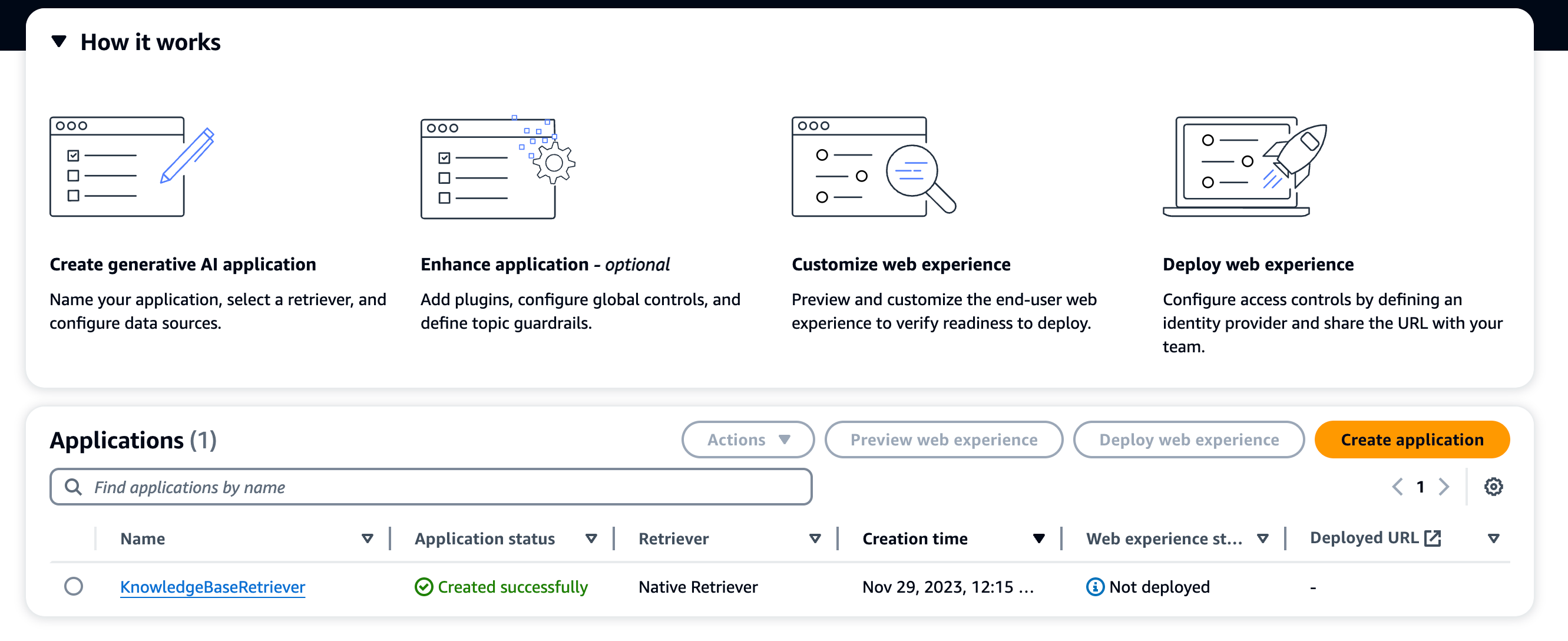 Amazon Q console with the Create application button
Creating a new Amazon Q application
Amazon Q console with the Create application button
Creating a new Amazon Q application
- There's an application quick start where you add details about the application, service roles and more. Authorization is built in, integrated with the service roles concept within AWS.
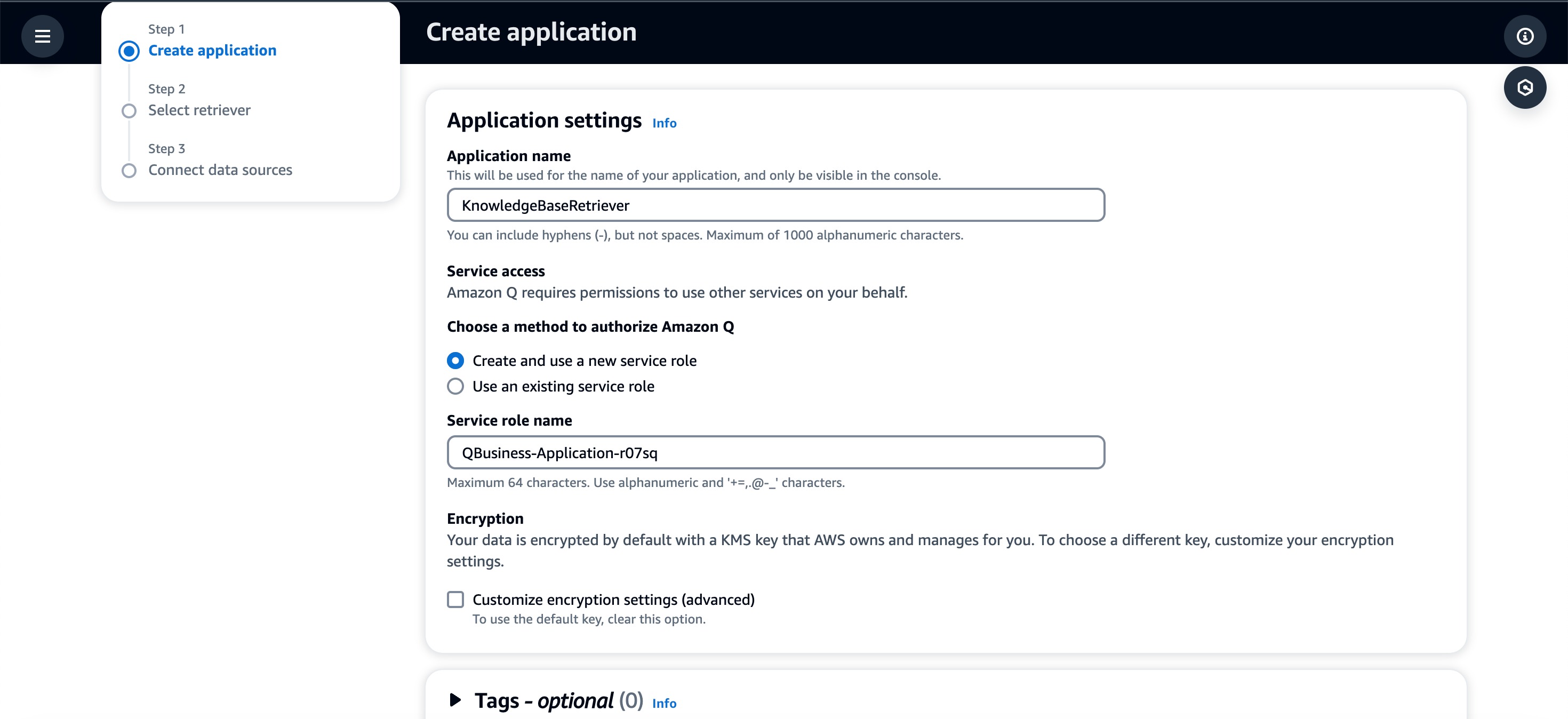 Amazon Q application quick start form
The application quick start
Amazon Q application quick start form
The application quick start
- Next, we set up our "retrievers", or data sources. It looks like they've built RAG capabilities into the application from within the UI. The application is based on Lambda functions, Kendra (their own version of a vector DB) and custom IAM.
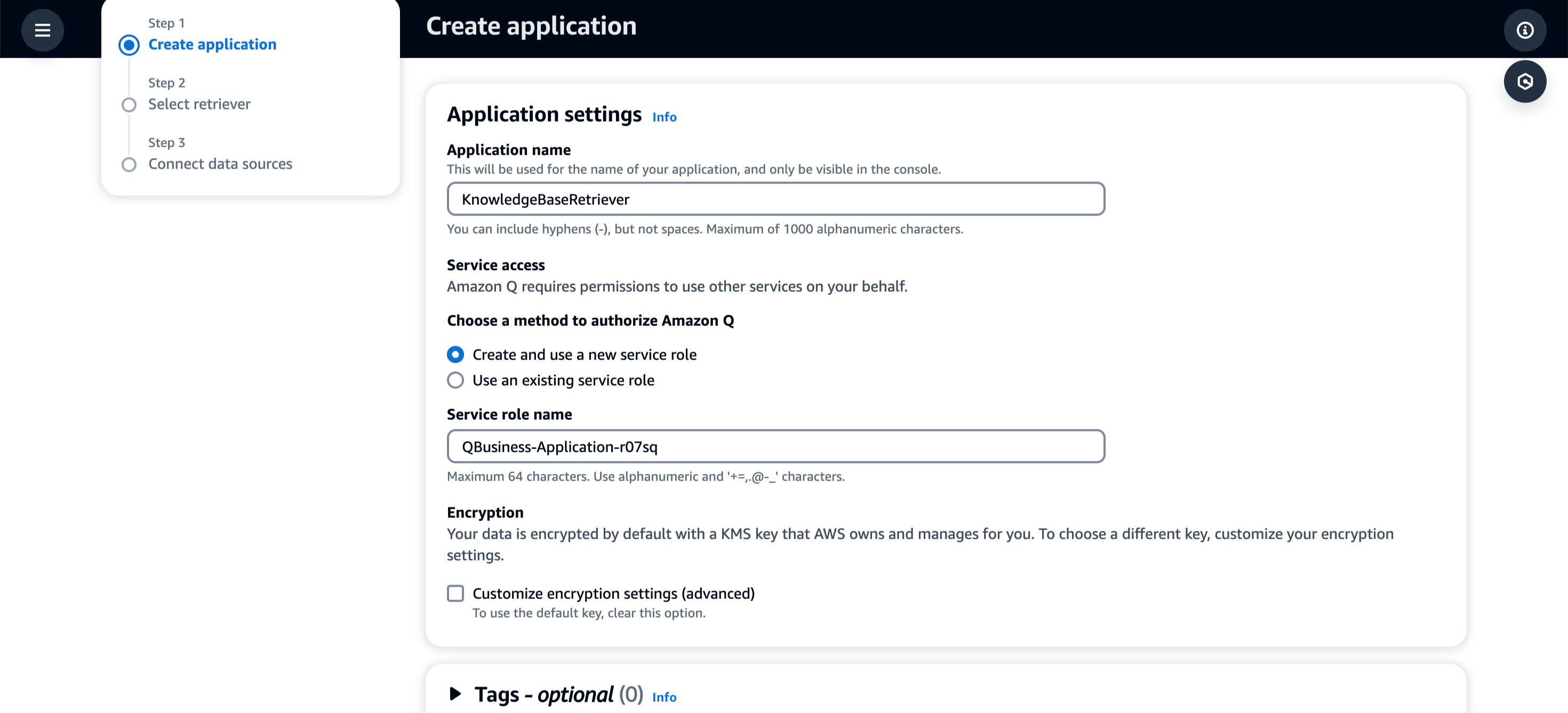 Amazon Q application settings: name, service role and encryption
Application settings: name, service role and encryption
Amazon Q application settings: name, service role and encryption
Application settings: name, service role and encryption
- There are a number of data sources you can connect to immediately in Q.
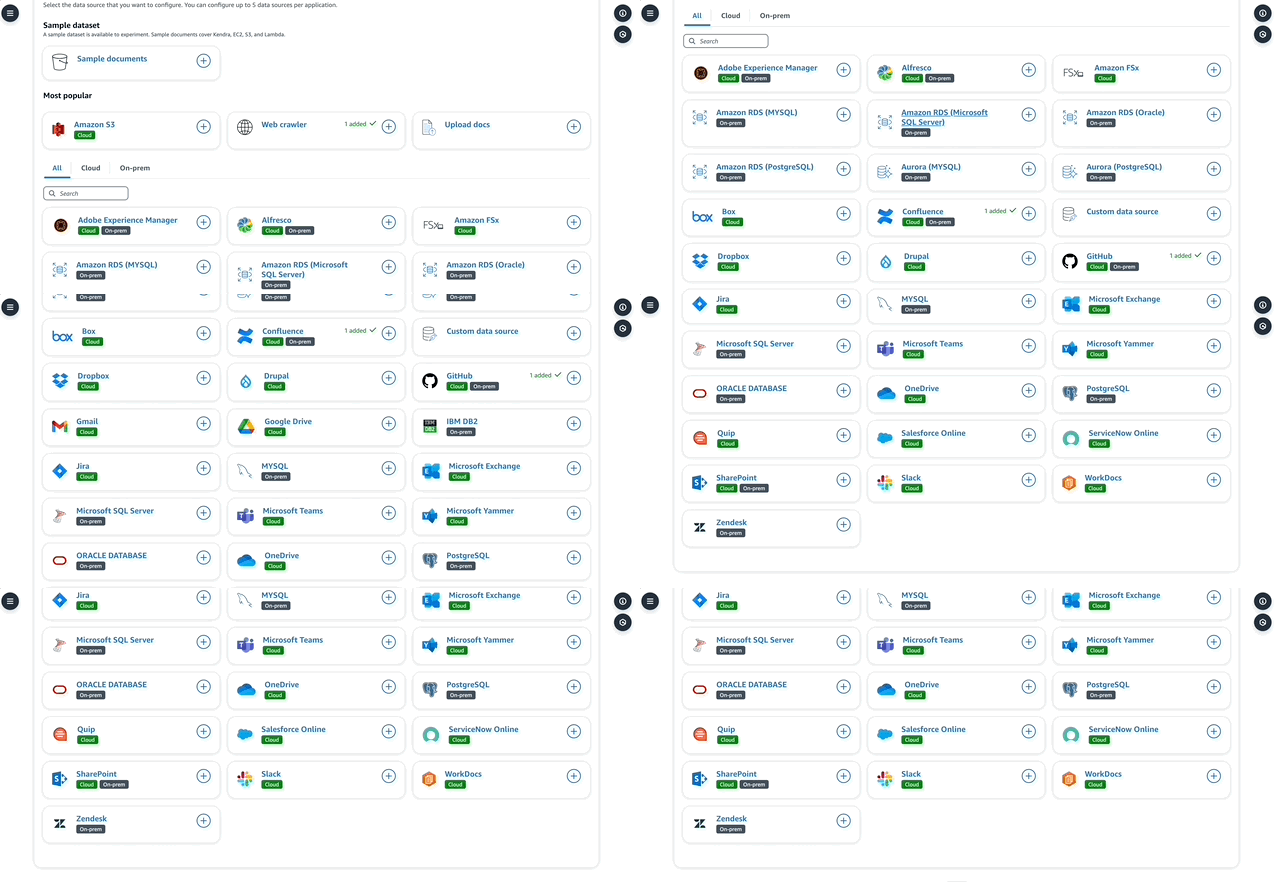 List of data source connectors available in Amazon Q
Available data sources
List of data source connectors available in Amazon Q
Available data sources
- While setting up a data source, you can define items like authentication (stored in Secrets Manager) and custom metadata, depending on the type of retriever. There's also an interesting "Web Crawler" data source, which can crawl specific websites and URLs for information. I was able to create a custom web crawler in Q by specifying some URLs. Q does a good job of indexing the documents it finds at those URLs, which is especially great if you're looking to build use cases around competitive intelligence, for example.
- On the Postgres connector, you have to define everything about the database you're connecting to (not great UX!). There's a lot of scope for improving data connectivity here. I shouldn't have to define everything about the data model before the source becomes operational!
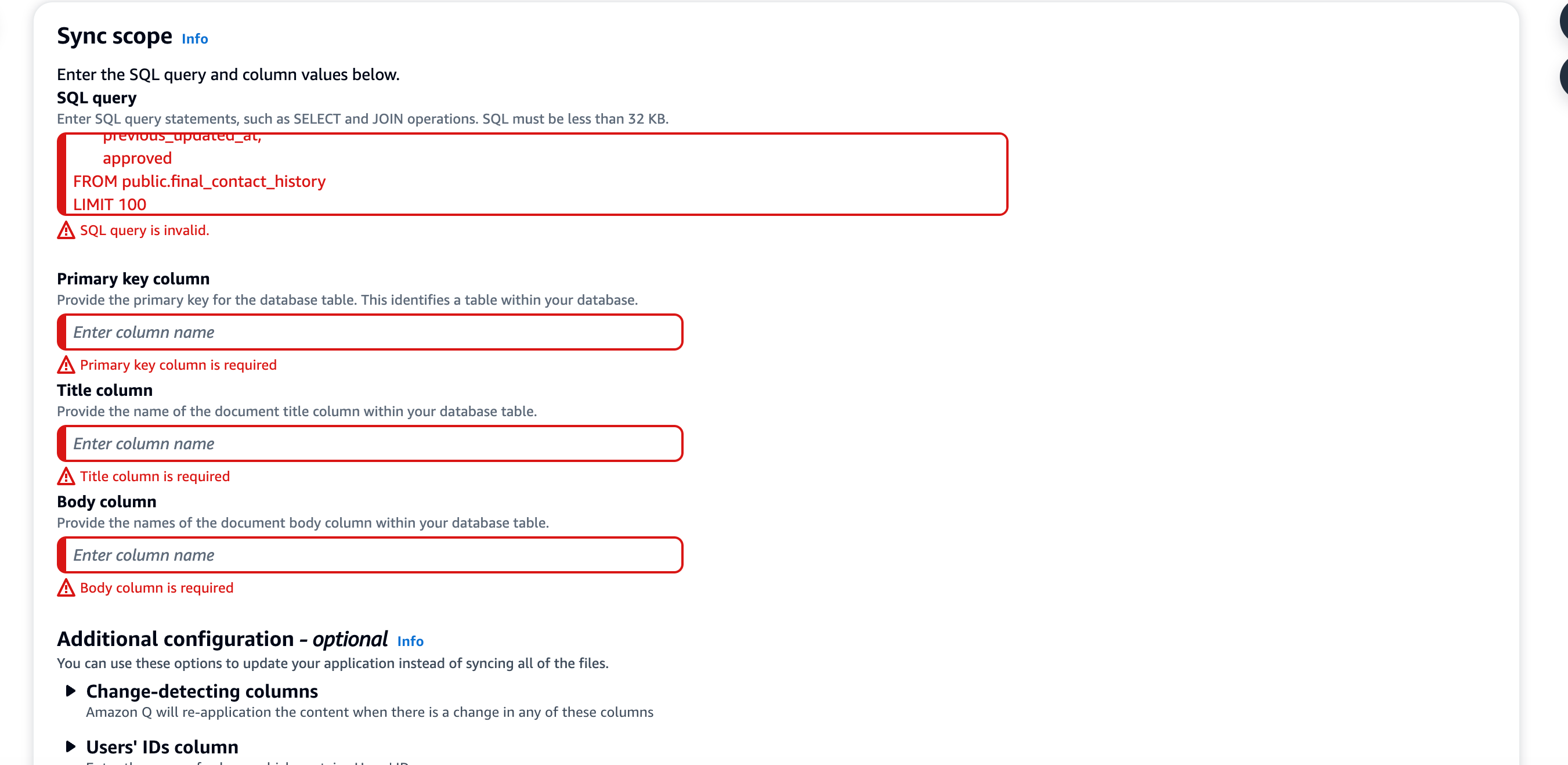 Configuring the Postgres connector in Amazon Q
Configuring the Postgres connector
Configuring the Postgres connector in Amazon Q
Configuring the Postgres connector
- Once your data sources are set up, just sync and wait. This also takes a long time today! There's scope for optimization here. I suspect the underlying Kendra service is doing a ton of ingress and egress to index and crawl through the content.
- Once synced, you can preview your bot using the out-of-the-box web experience. It comes pre-packaged with file upload, conversation history and more. Essentially, your own version of "ChatGPT" with your own data.
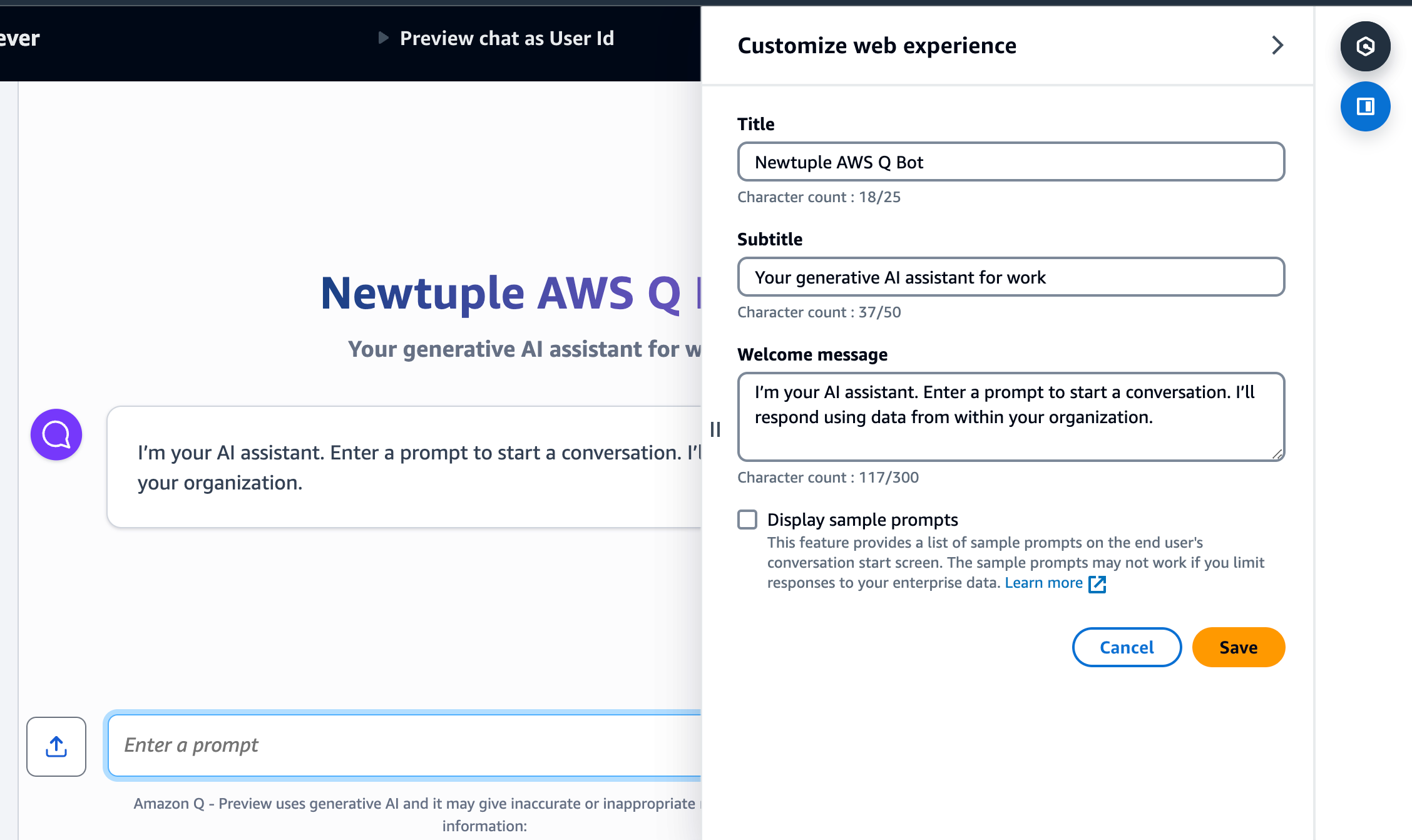 Customizing the Amazon Q web experience before previewing the bot
Customizing and previewing the built-in web experience
Customizing the Amazon Q web experience before previewing the bot
Customizing and previewing the built-in web experience
So what's the (very early) verdict on Q?
This is AWS's own shot at getting a slice of the rapidly expanding market for GenAI apps within the enterprise. The big cloud vendors are essentially picking up product and service ideas from the GenAI community. RAG-based applications have been around for nearly a year now, and AWS and GCP are following the lead set by Azure in providing generative AI capabilities to enterprises on top of their own data.
Overall, this is an offering with great promise for enterprises. I think a one-stop AI app that accesses your enterprise data, governed by the robust security and access control methods inside AWS, is valuable. Although there are some rough edges in the way it's developed and deployed today, I can see it being a great entry into GenAI for enterprises looking for a well-structured way into the AI wave. Plus, you can count on AWS ramping up this offering over time.
I'll end with this: for those of you who have been building GenAI apps, especially those that use RAG, none of these technologies or apps are new. However, what AWS (and Azure and GCP) are doing with this kind of offering is bringing some of these GenAI capabilities into the enterprise mainstream, by building in data security and role-based access, and positioning it for the enterprise audience. "Your data is never used for training" is a key selling point. All LLM vendors say this too, but AWS comes with the entire set of tooling and credibility in the enterprise.
FAQ
What is Amazon Q? It's AWS's family of generative AI assistants. It launched in November 2023 as a managed service that answers questions from your company's own data. It later split into Amazon Q Business (for enterprise data) and Amazon Q Developer (for software development).
Is Amazon Q Business still available? AWS says Q Business is no longer available to new customers. Existing customers can keep using it, and AWS points new customers to Amazon Quick, which it describes as the next evolution of Q Business.
What happened to Amazon Q Developer? AWS will end support for the Q Developer IDE plugins on April 30, 2027, and recommends Kiro, its agentic coding tool, for similar capabilities.
What is RAG? Retrieval-augmented generation. Before answering, the AI searches your documents and data for relevant information, then uses it to write the answer. This keeps answers grounded in your own content.
Want help building AI assistants on your company's data? Talk to Newtuple.