Short answer: if you just need to run a large number of independent LLM calls and can wait a few hours, use your provider's batch API. OpenAI, Anthropic and Google all offer one at about half the normal price. If your job has several steps, needs to save results as it goes, or needs replays, rollbacks and audits, build a pub/sub pipeline: a publisher puts each job on a queue, and workers call the LLM and store the results. Many teams use both.
 Batch processing & LLMs
Batch processing & LLMs
Batch processing & LLMs
We at Newtuple build applications that use large language models (LLMs) from providers like OpenAI, Anthropic and Google. Often, we have to run bulk jobs that need many LLM calls. Some examples:
- Running an LLM against hundreds of documents with a multi-step approach that includes entity extraction, saving to a database, versioning and ranking.
- Evaluating many news sources across different dimensions, for example supplier risk assessment by country and region. A bulk job identifies, prioritizes and summarizes all the news sources in one go.
- Benchmarking, where you give an LLM many kinds of text input, collect the results, and compare inputs and outputs across all the data, using aggregations or dashboards to get the full picture.
Running batch jobs on top of LLMs is one of the fastest-growing use cases in GenAI apps. Batch jobs are used for creating benchmarks and evaluations, AI-powered data ingestion for large numbers of files, and running many inference calls for a client.
What changed since the original post (2024): all the major LLM providers now offer a discounted batch API, so we've added a section on when to use one and when to build your own pipeline. We also replaced a broken internal link, updated the code for current SDKs, and added an FAQ.
Should you use a provider batch API?
The infrastructure for batch runs is now readily available from the model providers themselves:
| Provider | Batch option | Price | Turnaround | Size limit per batch |
|---|---|---|---|---|
| OpenAI | Batch API | 50% off | Within 24 hours | 50,000 requests or 200 MB |
| Anthropic | Message Batches | 50% off | Most within 1 hour, max 24 hours | 100,000 requests or 256 MB |
| Gemini Batch Mode | 50% off | Target 24 hours, often faster | 2 GB input file |
Limits as of September 2026. Check each provider's docs before you plan around them.
A batch API is the right choice when:
- Each request stands on its own (one document in, one answer out).
- You can wait for the results.
- You mainly care about cost.
It's less suited when your job has several dependent steps, when you need results to appear in your database as soon as each one finishes, or when you need tight control over retries. That's where your own backend comes in, with questions like:
- How do you sequence your generations?
- How do you replay some or all of a bulk upload efficiently?
- How do you roll back changes to a document repository that an LLM populated, partly or fully?
- How do you audit and improve your prompt-response pairs when hundreds or thousands of documents are processed together?
The answer: a pub/sub architecture for your backend
Traditional pub/sub architectures solve a lot of the problems with bulk uploads and bulk inference on LLMs. The technology has been around for a while, but GenAI applications give us many more reasons to use it. Here's what a pub/sub architecture looks like:
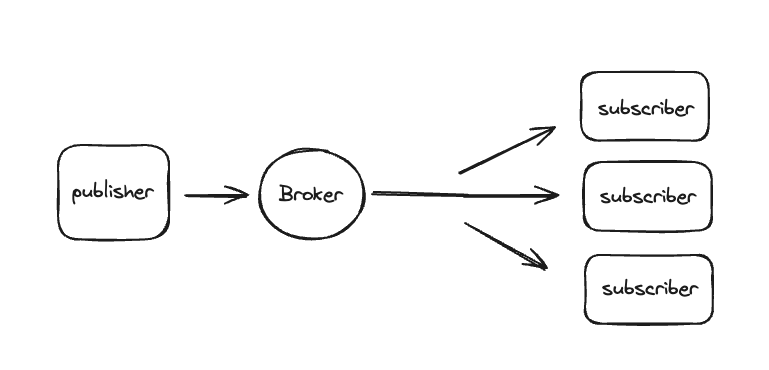 A publisher/subscriber architecture
Pub/sub overview
A publisher/subscriber architecture
Pub/sub overview
The idea behind a pub/sub system is:
- It maintains a queue of messages.
- A publisher pushes messages (inputs) to the queue, under a topic.
- A subscriber subscribes to one or more topics, and receives every message published to them.
- Once a message is received, it's sent to an LLM for processing, and the output is stored in a SQL or NoSQL database.
Why pub/sub works well for LLM batch jobs
- Decoupled application logic: the main flow of your application stays separate from the slow LLM work, which keeps the overall system robust.
- Automatic failure handling: failed messages go back on the queue to be processed again, until they reach a maximum delivery count. After that, they move to a dead-letter queue for later inspection.
- Scalability: you can queue millions of messages and run as many subscribers as you need, which cuts turnaround time. You scale horizontally, on the same infrastructure.
- Easy to integrate: pub/sub services plug into existing applications through provider SDKs, such as those for Kafka, Google Cloud Pub/Sub or Azure Service Bus.
- Works with rate limits: you control how many workers call the LLM at once, so you stay inside your provider's rate limits instead of hitting them all at the same time.
Demonstration with Azure Service Bus
You can use any queue service: Kafka, Google Cloud Pub/Sub, Azure Service Bus, Amazon SQS or SNS, and so on. Here's how to do it with Azure Service Bus:
- Create a Service Bus namespace, topic and subscription, plus a publisher and subscriber. Follow our step-by-step guide: Build a pub/sub data pipeline with Azure Service Bus and Python.
- Once that works, change the subscriber so it sends each message to an LLM.
- Add a function for your use case:
import os
from openai import OpenAI

client = OpenAI(api_key=os.environ["OPENAI_API_KEY"])
MODEL = "your-model-name"  # check your provider's current model list


def your_usecase_func(job):
    response = client.chat.completions.create(
        model=MODEL,
        messages=[{"role": "user", "content": f"[YOUR PROMPT GOES HERE]\n\n{job['text']}"}],
    )
    answer = response.choices[0].message.content

    # Save the output, then aggregate or visualize it:
    # save_response_to_db(job["job_id"], answer)
    return answer
Then call it from the subscriber's processing step, while the publisher keeps sending new inputs to the queue:
def process(job):
    your_usecase_func(job)
In the subscriber from our pub/sub guide, this process function runs for every message. If the LLM call fails, for example because of a rate limit, the message is released back to the queue and retried automatically.
And voilà, now you have:
- A publishing service that keeps sending inputs.
- A receiving service that processes each input with an LLM (benchmarking, entity extraction and so on), saves the responses to a database, and feeds aggregation and visualization.
Combining both approaches
You don't have to choose one. A common pattern: your pub/sub pipeline groups incoming jobs, submits them to a provider batch API for the lower price, and a worker collects the results and writes them to your database when the batch finishes. You keep the control and the audit trail, and still get the discount.
Once the system is in place, the real magic begins
Once the pipeline from content to generation is built, you can connect it to your data engineering pipeline, which feeds data modeling, visualization and more.
Here's an example of how you might use pub/sub for supplier risk assessment and benchmarking:
- Metrics analysis: for every risk dimension, get risk scores and keywords for qualitative analysis, and turn them into structured data procurement managers can use. Model and aggregate the results with a tool like dbt.
- Data visualization: run ad-hoc analysis and present it to procurement managers in a dashboard tool like Apache Superset, to spot new trends.
- Advanced aggregation: use platforms like MongoDB for aggregation pipelines, or Elasticsearch for text search and result normalization.
Conclusion
Provider batch APIs now make large LLM jobs cheaper and simpler than ever. For fine-grained control over how your application behaves, it still makes a lot of sense to design a pub/sub architecture for your backend.
Batch processing with LLMs on a pub/sub architecture streamlines operations and opens up new ways to handle and analyze data. Whether you're running evaluations or ingesting large datasets, combining these technologies gives you a robust answer to the complexity of modern data processing.
FAQ
What is batch processing with LLMs? It means sending many LLM requests as one job instead of one at a time, for example summarizing 5,000 documents. The results come back together, or as each request finishes.
How much cheaper are batch APIs? OpenAI, Anthropic and Google Gemini all charge about 50% of the normal price for batch requests. In return, results can take up to 24 hours.
When should I build my own pipeline instead? When your job has several dependent steps, when results must be saved as soon as each one is ready, or when you need replays, rollbacks and detailed audit trails.
How do I avoid hitting rate limits? Limit how many workers call the LLM at the same time, and retry failed calls with a delay. A queue makes both easy, because failed messages are retried automatically.
References
- OpenAI: Batch API guide
- Anthropic: Message Batches
- Google: Gemini Batch Mode
- Microsoft: Service Bus topics and subscriptions
- OpenAI Python library
- dbt guides · Apache Superset · Elasticsearch docs
Want help running LLM workloads at scale? Talk to Newtuple.